I Tried ChatGPT AI Photo Editing Prompts and Honestly Wasn’t Ready for What Happened
My friend sent me a photo last week. Same boring selfie. But with this glow, this filmy look, this cinematic background — and I literally asked her “kahan ki photo hai yeh?” She laughed and said ChatGPT did it. That’s when I realized I had been sleeping on this whole thing.
What Exactly Is This 3 Layer AI Photo Editing Thing?
Okay so basically — log ChatGPT ki image editing feature use kar rahe hain apni normal photos ko transform karne ke liye. Aur result? Almost magazine jaisa lagta hai. Seriously.
The “3 layer” part is actually pretty simple. First you describe the person in the photo. Then you tell the AI what kind of mood or lighting you want. And then you describe the background. That’s your three layers. Done.
One prompt. That’s it. And the output looks like someone spent hours editing it professionally.
It works for everyone — boys, girls, couples, solo shots. Koi bhi try kar sakta hai. And honestly in 2026, Chat GPT’s image model has become really really good. Like it’s not the same thing it was even a year ago. The results are actually impressive now.
Create Chat GPT 3 Layer AI Photo Editing Prompts — Complete Guide
So let me walk you through how this actually works. You don’t need Photoshop.( Abb sab kuch Ai se Hau jata hai so easily ). You don’t need Lightroom. You just need Chat GPT or any AI tool with image editing.
Step one is uploading your photo. Open kro ChatGPT, add your image if u want better , and upload your best photo . Pick a photo that has decent lighting already — not too dark, not too blurry. The AI works better when the original is clear. Think of it like giving good raw material to a good cook. Better input means better output. Step two is writing your 3 layer prompt. This is where most people go wrong. They write something like “make this look good” and then wonder why the result is meh. You have to be specific. Three layers means — who is in the photo, what mood or edit style do you want, and what background or environment should be created
AI Photo Editing Tips That Actually Make a Difference
The biggest thing most people get wrong is they try to describe too many things in one go without structure. The prompt becomes a big mess and the AI gets confused. The 3 layer format keeps things clean because you are basically giving the AI a checklist in order.
Another thing — always mention “keep the face realistic” somewhere in the prompt. Seriously. Without this line, sometimes the AI will smooth skin so much the person looks like a wax statue. Not cute. Not flattering. Just weird.
What surprised me honestly was how much the color grade changes the entire feeling of the photo. I always thought photo editing was about removing pimples or fixing brightness. But when I tried the teal and orange grade on a plain outdoor photo — it looked like a scene from a movie. Same photo. Just different colors. The emotional impact was completely different.
Also — the photo you upload matters a lot. If you upload a photo where the face is half hidden or the angle is awkward, the AI will struggle. Give it a clean face-forward photo for best results. And natural light photos work better than tube light or yellow bulb photos.
One more thing I noticed — for couples photos, mention both people clearly in the prompt. Say “both subjects” or “both faces” so the AI gives equal attention. Otherwise it might focus on one person and slightly blur or darken the other.
Chatgpt 3 Layer Ai Prompts
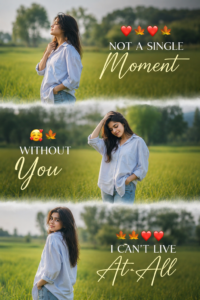
A cinematic vertical triptych collage featuring the SAME young man standing alone in a lush green field during bright natural daylight. The collage is divided into three horizontal cinematic frames with soft dreamy white fade transitions between each section. He is wearing an oversized stylish shirt, casual loose-fit outfit, or denim jacket with jeans, creating a soft emotional and aesthetic vibe. The background contains blurred green grass fields, distant trees, dreamy natural bokeh, shallow depth of field, warm sunlight, cinematic outdoor atmosphere, and realistic natural colors. Maintain ultra-realistic facial details, natural hairstyle, realistic skin texture, emotional expressions, and DSLR-quality photography. Top frame: side profile pose looking upward calmly with wind flowing through hair. Middle frame: emotional pose with one hand in pocket and eyes lowered thoughtfully. Bottom frame: looking back toward camera with soft confident smile. Add stylish romantic cinematic typography: “❤️🍂❤️🍂 EVERY MOMENT WITHOUT YOU 🥺🍁 FEELS EMPTY 🍁❤️❤️” Use elegant serif + handwritten script typography with glowing cinematic text styling. Add dreamy white mist blending between frames. Ultra realistic, emotional photography, luxury Instagram aesthetic, soft natural tones, cinematic color grading, 8K detailed portrait. Aspect Ratio: 2:3
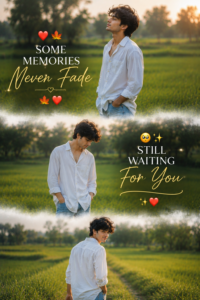
A cinematic vertical triptych collage featuring the SAME young man standing alone in a lush green countryside field during bright golden natural daylight. The collage is divided into three horizontal cinematic frames with soft dreamy white mist transitions between each section. The atmosphere feels emotional, peaceful, stylish, and cinematic. The boy is wearing an oversized white shirt, casual loose-fit outfit, or stylish denim-inspired fashion with blue jeans, creating a soft aesthetic emotional vibe. Background contains blurred green grass fields, distant trees, glowing sunlight, dreamy natural bokeh, shallow depth of field, and soft cinematic haze. Maintain ultra-realistic face identity, realistic skin texture, natural hairstyle, emotional expressions, realistic body proportions, and DSLR-style photography. Top frame: side-profile pose looking toward the sky peacefully with soft sunlight on face. Middle frame: emotional candid pose with one hand in pocket and eyes lowered naturally. Bottom frame: walking slowly through the field while looking back toward camera with a soft cinematic smile. Add emotional cinematic typography: “❤️🍂 SOME MEMORIES NEVER FADE 🍂❤️ STILL WAITING FOR YOU 🥺✨” Use elegant serif and handwritten script fonts with glowing cinematic styling. Add dreamy white fog blending between frames. Luxury Instagram aesthetic, ultra realistic photography, emotional storytelling, warm golden tones, cinematic color grading, soft natural light, 8K detail. Aspect Ratio: 2:3
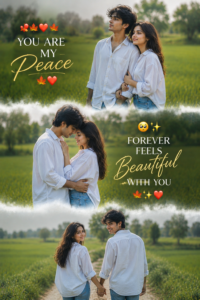
A dreamy cinematic vertical triptych collage featuring the SAME young couple in a beautiful green countryside field during soft natural daylight. The collage is divided into three horizontal frames with smooth dreamy white mist transitions between each section. The atmosphere feels emotional, romantic, peaceful, and cinematic. The boy wears a stylish oversized shirt with jeans, while the girl wears a loose casual shirt and denim outfit. Background includes blurred green grass, distant trees, glowing sunlight, dreamy natural bokeh, shallow depth of field, and soft cinematic haze. Keep ultra-realistic face identity, realistic skin texture, emotional expressions, and DSLR-style photography. Top frame: couple standing side-by-side under sunlight with peaceful expressions. Middle frame: emotional romantic candid pose with forehead touch and soft smiles. Bottom frame: walking together while looking back toward camera naturally. Add emotional romantic typography: “❤️🍁 YOU ARE MY PEACE 🍁❤️ FOREVER FEELS BEAUTIFUL WITH YOU 🥺✨” Use elegant cinematic typography combining serif and handwritten script fonts with glowing soft light effect. Add dreamy white fog transitions between frames. Luxury Instagram aesthetic, ultra realistic photography, cinematic color grading, emotional storytelling, 8K detail. Aspect Ratio: 2:3
How To Actually Use These Prompts in ChatGPT or Gemini
Okay so if you are on ChatGPT — you need GPT-4o, which is part of ChatGPT Plus. Open the chat, click the image icon or attachment icon, upload your photo. Then in the text box paste your 3 layer prompt exactly as written. Hit enter. Wait about 20 to 30 seconds. The edited photo will appear right there in the chat.
You can then download it directly. Or you can reply with more instructions like “now make the background slightly darker” and it will edit further. See, this is where it gets fun — you are basically having a conversation with your photo editor.
On Gemini — if you have Gemini Advanced with image generation enabled, same process. Upload the photo, paste the prompt, and let it work. Gemini sometimes handles color grades a little differently so you might get slightly different results. Try both if you want to compare.
And look — sometimes the first result will not be perfect. That’s normal. Just go back and tweak the prompt a little. Add one more detail. Remove something that confused it. The more you try, the better you understand how these models think.
But don’t overthink it. Start with the prompts I gave above. They work. the right prompt together can help AI create much more realistic and professional-looking photos.
Honestly? This Is Just Fun- sab mast
I think what I like most about this is that it’s not gatekept behind expensive software or years of editing skills anymore. Anyone with a phone and a ChatGPT account can make a photo look like a professional shoot. That feels like a big deal to me.
And yes, some people will say it’s not “real” editing or whatever. But yaar, who cares. If it makes your photo look nice and you enjoy sharing it — that’s enough. Bas itna hi chahiye.
Frequently Asked Questions (FAQ)
Is 3 Layer AI Photo Editing only for boys?
Not at all. This style works beautifully for boys, girls, and couples. Each gives a different feel — boys get a sharp cinematic look, girls get a soft aesthetic vibe, and couples get a romantic emotional feel.
Can I create these photos using a mobile phone?
Yes, absolutely. Both ChatGPT and Gemini have mobile apps that work perfectly. Just take a clear selfie, open the app, upload your photo, paste the prompt, and your cinematic photo is ready in seconds.
What is the most important thing for a good AI photo?
Two things matter the most — a clear well-lit selfie and the right prompt. If your photo is blurry or heavily filtered, the AI result will not look good. Always use a natural photo with good lighting for the best output.
Why does my AI photo not look like my face?
This usually happens because of a low quality or heavily filtered source photo. Remove beauty filters, use a front facing photo in natural daylight, and make sure your face is clearly visible. A clean photo always gives a much better face match.
Is this trend going to stay popular or is it just temporary?
This style is definitely here to stay. The cinematic and emotional look is timeless and AI tools are only getting better. More people are discovering this trend every day and the engagement these photos get on Instagram is consistently high.